How to Create a WhatsApp Link With a Pre-filled Message
by Julius, Director & Strategic Development Partner
Many customers would rather send a WhatsApp message than fill in a contact form. A WhatsApp link lets them do that in one tap: it opens a chat with your business, and it can even type the first message for them.
This guide shows how the link works, how to add a pre-filled message, and how to put the link behind a button you already have. If you just want the link, our free generator builds it for you.
Open the free WhatsApp Link Generator
What Is a wa.me Link?
A wa.me link is WhatsApp's click to chat address. It has two parts: the wa.me address and your phone number.
https://wa.me/27123456789
When someone opens it, WhatsApp starts a chat with that number. They do not need to save your number first.
How to Add a Pre-filled Message
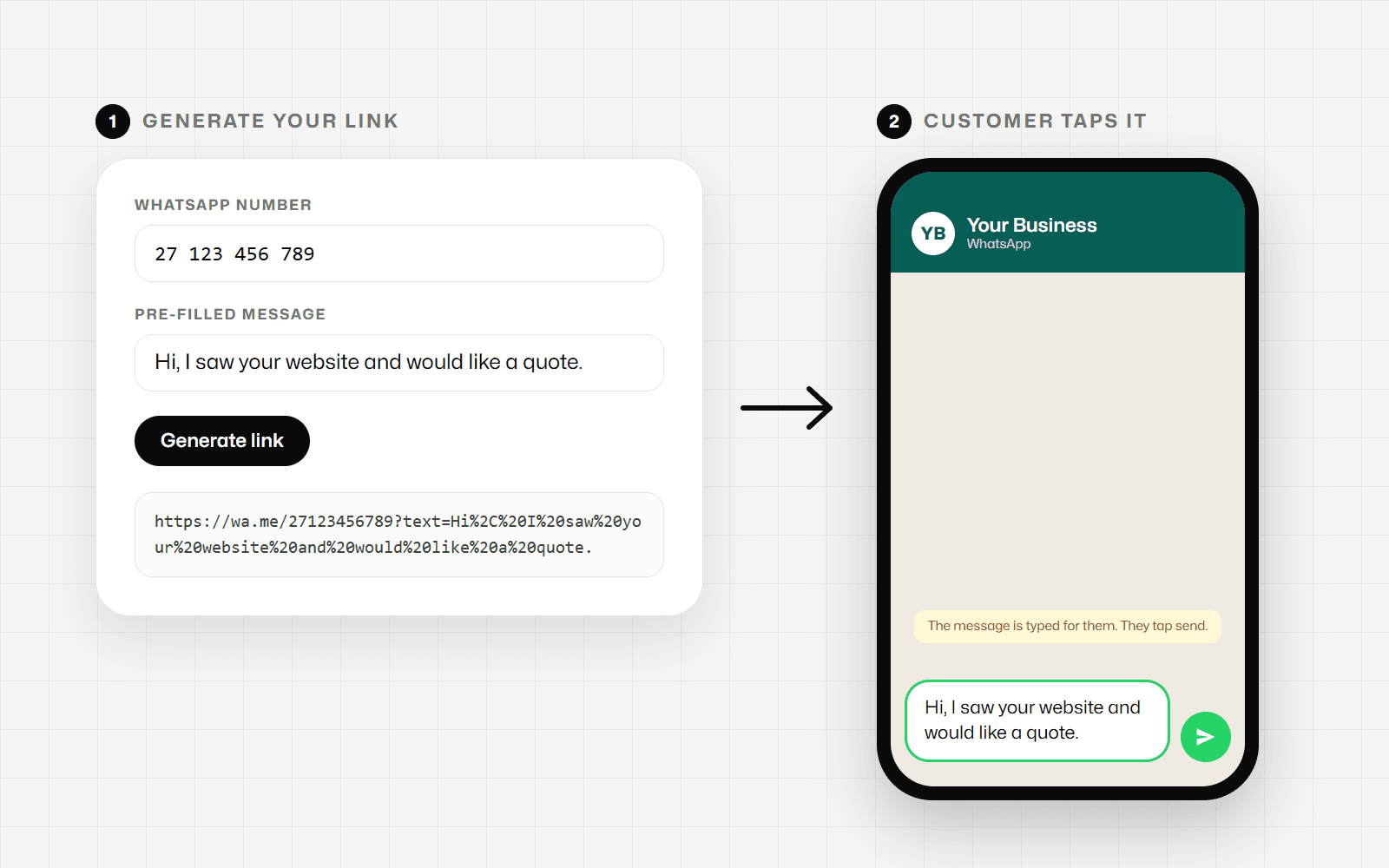
To start the chat with a message already typed, add a text parameter to the end of the link:
https://wa.me/27123456789?text=Hi%2C%20I%20would%20like%20a%20quote.
The message has to be encoded for a web address. Spaces become %20, commas become %2C, a question mark becomes %3F, and so on. Typing these by hand is where most links break, which is why a generator helps.
The customer sees the message in their chat box and can edit it before sending. Nothing is sent until they press send.
Getting the Phone Number Right
The most common mistake is the phone number format. The link needs the full international number:
- Start with the country code, for example 27 for South Africa or 44 for the United Kingdom.
- Leave out the leading 0 of the local number, if it has one.
- Leave out spaces, dashes, brackets and the + sign.
Here is how that works in a few countries. The numbers are examples only.
| Country | Country code | Number as written locally | Number in the link |
|---|---|---|---|
| South Africa | 27 | 0123 456 789 | 27123456789 |
| United Kingdom | 44 | 07123 456789 | 447123456789 |
| India | 91 | 012345 67890 | 911234567890 |
| United States | 1 | (123) 456-7890 | 11234567890 |
US numbers have no leading 0 to drop, so you only add the 1 in front. The rule is the same in every country: country code first, then the rest of the number without the leading 0.
The Faseelus generator removes spaces, dashes, brackets and the + for you, and warns you if the number still starts with 0.
How to Create the Link With the Free Generator
- Open the WhatsApp Link Generator.
- Enter your WhatsApp number with the country code.
- Type the message you want customers to start with. This is optional.
- Press Generate link.
- Copy the link, or copy the ready-made button code.
Use Test the link to check it opens the chat you expect before you share it.
Putting the Link Behind an Existing Button
You do not need a new button. Most website builders, including WordPress, Wix and Shopify themes, let you set where a button goes in a field called Link or URL. Paste your WhatsApp link there and save.
The same link works in other places too:
- A Contact us or Chat with us menu item.
- Your Instagram, Facebook or LinkedIn profile bio.
- Your email signature or newsletter.
- A QR code on flyers, menus or packaging.
If your site does not have a button yet, the generator also gives you a small piece of HTML for a green Chat on WhatsApp button that you can paste into your page.
Writing a Good Pre-filled Message
A pre-filled message helps the customer start the conversation and tells you where they came from. A few tips:
- Keep it short, so it is easy to edit.
- Say where they found you, for example "Hi, I saw your website and would like a quote."
- Use a different message for each place you share the link, so you can see which channel brings in chats.
WhatsApp does not publish a limit for pre-filled messages. Our generator caps the message at 500 characters so the link stays short enough to share comfortably.
Frequently Asked Questions
Is the WhatsApp Link Generator free?
Yes. It is a free Faseelus tool and does not need an account.
Does Faseelus store my number or message?
No. The link is built in your browser, and Faseelus does not save your number or message.
Can I change the message later?
The message is part of the link, so a new message means a new link. Generate it again and replace the old link wherever you used it.
Does the link work on a computer?
Yes. On a phone it opens the WhatsApp app. On a computer it opens a WhatsApp page where the person can continue to the chat in the WhatsApp desktop app or in WhatsApp Web.
Built by Faseelus
Faseelus is a Cape Town technical partner that builds, hosts and maintains websites and platforms for businesses. Free tools like this one are part of how we help small businesses get more out of the channels they already use.
Open the free WhatsApp Link Generator
If you want WhatsApp, forms and enquiries to work together properly on your website, we can help you plan it.